📌 Notes you keep in sight · Always-on-top, translucent & minimal

Pinette
让便签一直在你眼前。

 即将推出
 即将推出
📌
Daily Priorities & Door Codes
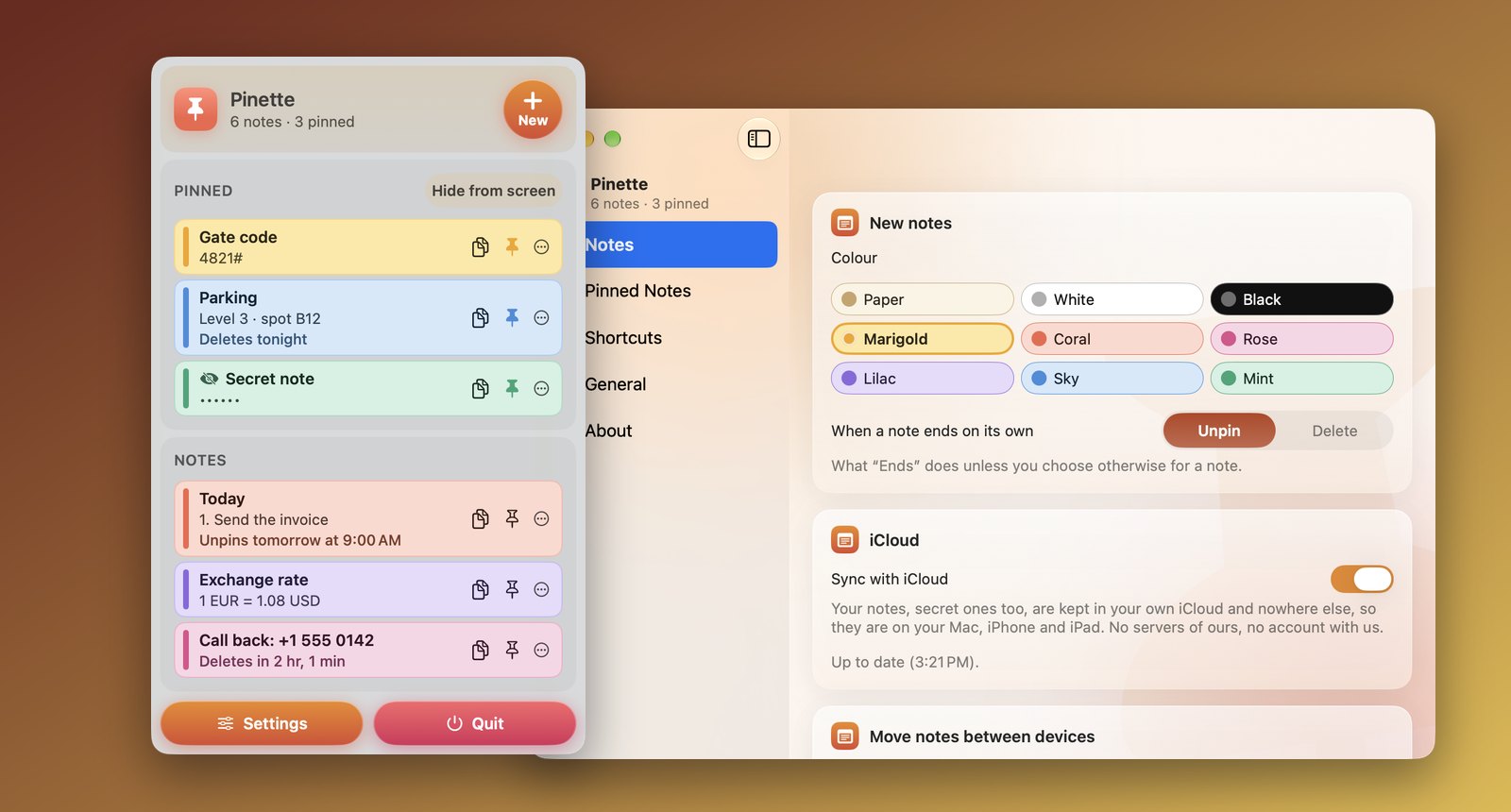
Visual simulation. On Mac, iPhone and iPad, Pinette floats above every open window with adjustable translucency.
它能做什么
Pinette 专为那些一天要查十次的东西而生:门禁密码、Wi-Fi 密码、停车位、要回拨的号码、今天要做的三件事。它把这些放在你目光所及之处:在 Mac 上浮于所有窗口之上,在 iPhone 上显示在锁定屏幕、待机显示和小组件中。一次购买即可在 Mac、iPhone 和 iPad 上使用;Android 版 Pinette 可在 Google Play 获取。
- 在 Mac 上浮于所有窗口之上。固定的便签浮在所有 App 之上,出现在每个空间中,也浮在全屏幕 App 上方,且绝不抢走键盘输入。可以把它拖到任意位置,或放在角落附近使其吸附到该角落。
- 点按一行即可拷贝。适用于密码、口令、地址。
- 私密便签。绝不会显示在小组件或锁定屏幕上;在 Mac 上,指针移到上面之前会保持模糊,并且不会出现在截屏和屏幕共享中。
- 到期自动结束的便签。2 小时、到今晚、到明天 9:00:到时便签会自动取消固定或删除。
- 够大、够醒目。文字大小最大 56 磅,九种纸张:从奶油色、白色、黑色,到万寿菊黄、珊瑚色、玫瑰色、丁香紫、天蓝色和薄荷绿。
- 一步记下便签。Mac 上的快速添加快捷键(⌃⌥⌘N)、控制中心的控制、快捷指令操作,以及共享表单中的“用 Pinette 固定”。
- 随处可去。便签的 QR 码可在另一部手机上用 Pinette 打开;便签可存为 .pinette 文件,通过 AirDrop 或“文件”传送。
需要 macOS 14 Sonoma 或更高版本;iPhone 和 iPad 需要 iOS 和 iPadOS 17 或更高版本;Android 需要 Android 8.0 或更高版本。
Standard notes apps vs Pinette
Keep vital phone numbers, codes, and daily checklists in sight above every window.
| Aspect | Standard Notes Apps | Pinette |
|---|---|---|
| Always in Sight | Notes get lost behind browsers and code editor windows | Floats above all windows, even in full-screen spaces |
| Clean Footprint | Cluttered with folders, sidebars, and formatting toolbars | Pure minimal floating card with zero interface clutter |
| Translucency Mode | Solid opaque card blocks documents underneath | Adjustable translucency lets you read text through the note |
| Quick Summon | Navigating window menus or cmd-tabbing repeatedly | Global keyboard shortcut to summon, pin, or hide in a flash |
| Native Checklists | Plain text or overly complex database tables | Markdown checklists, auto-links, and strike-through tasks |
一段话说清隐私
Pinette 没有自己的服务器,没有账户,没有跟踪,也没有数据分析,开发者不收集任何数据。你的便签保存在你的设备上;在 Mac、iPhone 和 iPad 上打开“与 iCloud 同步”时,还会保存在你自己的私有 iCloud 中,只有你能看到。完整的隐私政策更详细地说明了同样的内容。
同一开发者的更多应用
小巧的应用,每一款都专心做好一件事。无需账户,没有广告,也没有一款会追踪你。
 Statuette在菜单栏查看 CPU、内存、磁盘和网络。Mac
 Tockette从菜单栏轻轻一拖,计时器就开始了。MaciPhone 和 iPadAndroid
 Zonette你关心的每个时区,点一下就能看到。MaciPhone 和 iPadAndroid
 Lunette月亮和太阳,一目了然。MaciPhone 和 iPadAndroid
 Lunarette四种传统的农历。MaciPhone 和 iPadAndroid
 Pausette为眼睛和腰背安排温和的休息。Mac
 Poisette坐直身子,由你戴着的 AirPods 提醒。MaciPhone 和 iPad
 Hushette宁静的环境音,从不循环重复。MaciPhone 和 iPadAndroid
 Tapsody打字时发出机械键盘的声音。Mac
 Thrumline你的心率,实时显示在菜单栏。MaciPhone 和 iPadAndroid
 Nightjar让 Mac 保持唤醒。实实在在。Mac
 Umbrette调暗一切,只留下你正在工作的窗口。Mac
 Prompette就在摄像头下方的提词器。MaciPhone 和 iPadAndroid
 Tallette为你的算账准备的一卷纸带。MaciPhone 和 iPadAndroid
 Probette媒体文件的所有技术细节,用通俗的话说清楚。MaciPhone 和 iPadAndroid
 Bindette把音频文件合成一本像样的有声书。MaciPhone 和 iPadAndroid
 Lettrette按发送时的原样打开 winmail.dat 和 .msg 文件。MaciPhone 和 iPadAndroid
 Nhanh Tay把四个答案排好顺序。要快。MaciPhone 和 iPadAndroid
 Usagette在菜单栏查看 Claude 用量上限。Mac
 Squiggo和友好的小伙伴一起画画。MaciPhone 和 iPadAndroid
 Foreman给手艺人的工作、报价单和发票。MaciPhone 和 iPadAndroid
 Tilewake画面会苏醒的滑块拼图。MaciPhone 和 iPadAndroid
 Chăm luyện越南语小学练习,题目都会朗读。MaciPhone 和 iPadAndroidWindows
 Salah全家人的祈祷时间。MaciPhone 和 iPadAndroid
 Kittiwake向新闻提一个问题,盯住一个信号。MaciPhone 和 iPadAndroid
 Readette为任何文章链接找到免费的相关阅读MaciPhone 和 iPadAndroid
 TinkerhallSee how everyday machines work, one part at a time.MaciPhone 和 iPadAndroid
 Snapline预测哪根杆件最先断。MaciPhone 和 iPadAndroid
 Leafette在一页收集,在另一页书写。MaciPhone 和 iPadAndroid
 Whence发明如何相连。MaciPhone 和 iPadAndroid
 WhimbrelShape a living world, then walk through it.MaciPhone 和 iPadAndroid
 Penduline规划、预览并编织日本组纽绳。MaciPhone 和 iPadAndroid
 Phalarope设计转起来就会动的动画圆盘、盘子和杯子。MaciPhone 和 iPadAndroid
 Turnstone设计卡片织带,再一梭一梭织出来。MaciPhone 和 iPadAndroid
 Redknot设计自动交织的凯尔特绳结图案。MaciPhone 和 iPadAndroid
 Sanderling设计线梭花边,再一针一针编出来。MaciPhone 和 iPadAndroid
 Dotterel用 3D 设计手鞠球,再一步步绣出来。MaciPhone 和 iPadAndroid
 Godwit设计真正的日晷,然后打印或切割。MaciPhone 和 iPadAndroid
 Dunlin只录一次。得到竖版和横版两个视频,拍完再为它们重新构图。iPhone 和 iPadAndroid
 Avocet把你钟爱的图片的色彩复制到自己的画面上,并以 3D LUT 随身带走。MaciPhone 和 iPadAndroid
 Greenshank一款火候真实的烹饪游戏:看着热量扩散,把食物从热点上挪开,在恰当的时刻翻面。MaciPhone 和 iPadAndroid
 Willet八音盒益智游戏:先听一段旋律,再用珠子和铃铛搭一台小机器,把它演奏出来。MaciPhone 和 iPadAndroid
 Courser一滑,一层。赶在潮水涨起之前,爬过海边悬崖和灯塔,登上灯。MaciPhone 和 iPadAndroid
 Surfbird录一段,跟着它演奏,把四条音轨叠在磁带上。每一次叠录都准确合拍。MaciPhone 和 iPadAndroid
 Curlew合并、分裂、翻转带数字的石头,让每个巢都放进恰好对应的数字。MaciPhone 和 iPadAndroid
 Yellowlegs按对顺序拔销钉:种子和水落进花盆,火炭挡在外面。MaciPhone 和 iPadAndroid
 Tattler五种经典铅笔逻辑谜题,提示会讲解每一步推理。MaciPhone 和 iPadAndroid
 Smew在手机上玩水拓画:滴入、梳理、旋转颜料,学习传统 ebru 纹样。MaciPhone 和 iPadAndroid
 Brolga观看 contra 舞的动态,自己编舞,检查是否可行,并练习喊舞。MaciPhone 和 iPadAndroid
 Lapwing搭好梯子,让每颗珠子落进自己的颜色。MaciPhone 和 iPadAndroid
 Pratincole设计彩色玻璃面板,找出难切的地方,把模板放在真实玻璃上。MaciPhone 和 iPadAndroid
 Fulmar设计单线风筝,调好拉线,打印真实尺寸的各片来裁剪缝制。MaciPhone 和 iPadAndroid
 Bittern为你的彩蛋图案上色,逐步得到上蜡与染色顺序。MaciPhone 和 iPadAndroid
 Killdeer按比例设计犬敏捷和 Hoopers 赛道,自动测量并按规则检查。MaciPhone 和 iPadAndroid
 Wrybill搭建会计数、做加法、能记忆的弹珠机器。MaciPhone 和 iPadAndroid
 Dowitcher读地震图,找震中,测地震的大小。MaciPhone 和 iPadAndroid
 Dovekie经典双人游戏,对手是会告诉你为什么的完美求解器。MaciPhone 和 iPadAndroid