📌 Notes you keep in sight · Always-on-top, translucent & minimal

Pinette
讓便條一直在你眼前。

 即將推出
 即將推出
📌
Daily Priorities & Door Codes
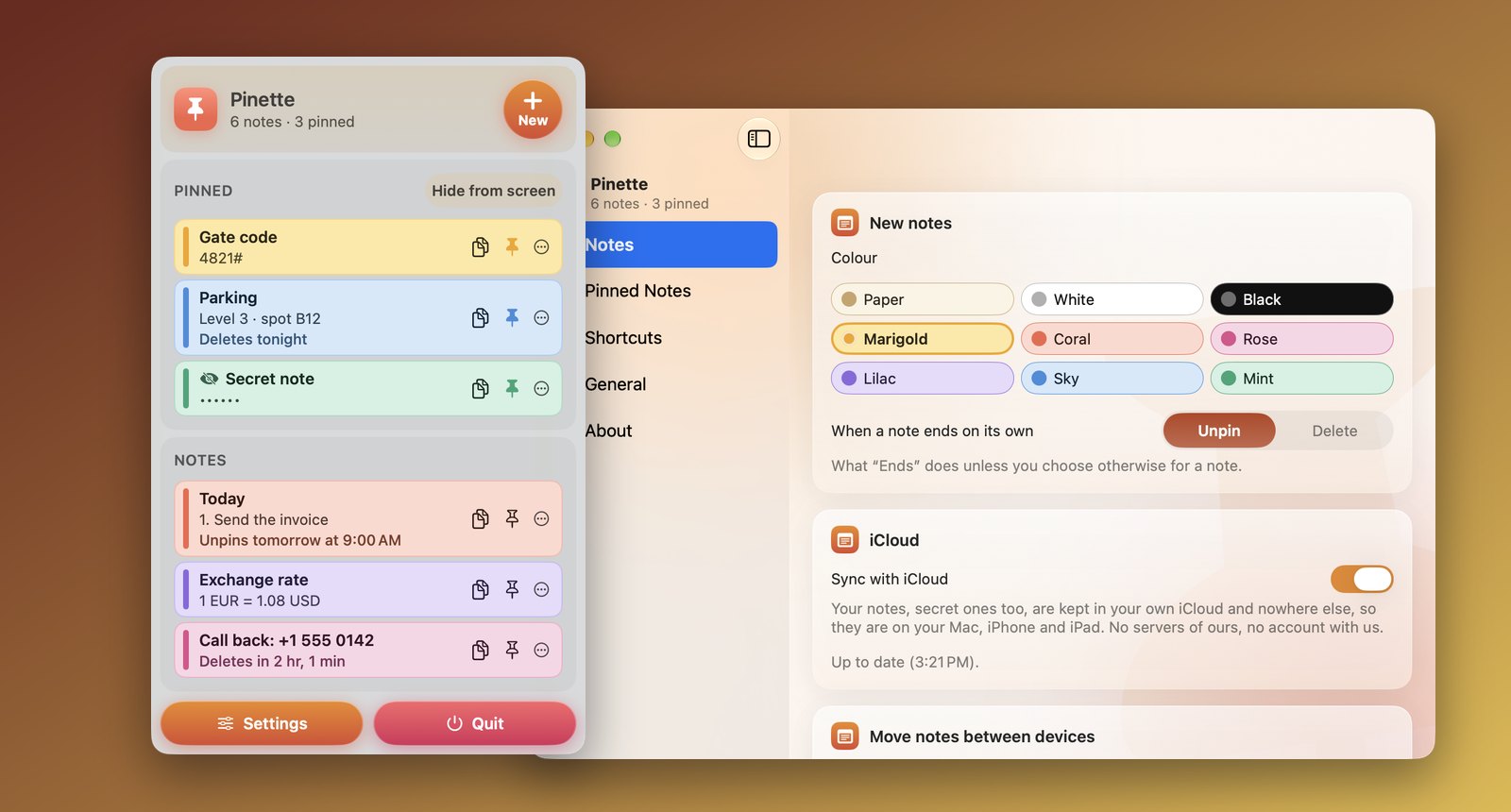
Visual simulation. On Mac, iPhone and iPad, Pinette floats above every open window with adjustable translucency.
它能做什麼
Pinette 專為那些一天要查十次的東西而生:大門密碼、Wi-Fi 密碼、停車位、要回撥的號碼、今天要做的三件事。它把這些放在你目光所及之處:在 Mac 上浮於所有視窗之上,在 iPhone 上顯示在鎖定畫面、待機模式和小工具中。一次購買即可在 Mac、iPhone 和 iPad 上使用;Android 版 Pinette 可在 Google Play 取得。
- 在 Mac 上浮於所有視窗之上。釘選的便條浮在所有 App 之上,出現在每個空間中,也浮在全螢幕 App 上方,且絕不搶走鍵盤輸入。可以把它拖到任何位置,或放在角落附近讓它貼齊該角落。
- 點按一行即可拷貝。適用於密碼、通關碼、地址。
- 私密便條。絕不會顯示在小工具或鎖定畫面上;在 Mac 上,指標移到上面之前會保持模糊,而且不會出現在截圖和螢幕共享中。
- 到期自動結束的便條。2 小時、到今晚、到明天 9:00:時間一到,便條會自動取消釘選或刪除。
- 夠大、夠醒目。文字大小最大 56 點,九種紙張:從奶油色、白色、黑色,到萬壽菊黃、珊瑚色、玫瑰色、丁香紫、天藍色和薄荷綠。
- 一步記下便條。Mac 上的快速加入快速鍵(⌃⌥⌘N)、控制中心的控制項目、捷徑動作,以及分享表單中的「用 Pinette 釘選」。
- 隨處可去。便條的 QR 碼可在另一支手機上用 Pinette 打開;便條可存成 .pinette 檔案,透過 AirDrop 或「檔案」傳送。
需要 macOS 14 Sonoma 或以上版本;iPhone 和 iPad 需要 iOS 和 iPadOS 17 或以上版本;Android 需要 Android 8.0 或以上版本。
Standard notes apps vs Pinette
Keep vital phone numbers, codes, and daily checklists in sight above every window.
| Aspect | Standard Notes Apps | Pinette |
|---|---|---|
| Always in Sight | Notes get lost behind browsers and code editor windows | Floats above all windows, even in full-screen spaces |
| Clean Footprint | Cluttered with folders, sidebars, and formatting toolbars | Pure minimal floating card with zero interface clutter |
| Translucency Mode | Solid opaque card blocks documents underneath | Adjustable translucency lets you read text through the note |
| Quick Summon | Navigating window menus or cmd-tabbing repeatedly | Global keyboard shortcut to summon, pin, or hide in a flash |
| Native Checklists | Plain text or overly complex database tables | Markdown checklists, auto-links, and strike-through tasks |
一段話說清隱私
Pinette 沒有自己的伺服器,沒有帳號,沒有追蹤,也沒有分析,開發者不收集任何資料。你的便條儲存在你的裝置上;在 Mac、iPhone 和 iPad 上開啟「與 iCloud 同步」時,也會儲存在你自己的私人 iCloud 中,只有你看得到。完整的隱私權政策更詳細地說明了同樣的內容。
同一開發者的更多 App
小巧的 App,每一款都專心做好一件事。無需帳號,沒有廣告,也沒有一款會追蹤你。
 Statuette在選單列查看 CPU、記憶體、磁碟和網路。Mac
 Tockette從選單列輕輕一拖,計時器就開始了。MaciPhone 和 iPadAndroid
 Zonette你在意的每個時區,按一下就能看到。MaciPhone 和 iPadAndroid
 Lunette月亮和太陽,一目了然。MaciPhone 和 iPadAndroid
 Lunarette四種傳統的農曆。MaciPhone 和 iPadAndroid
 Pausette為眼睛和腰背安排溫和的休息。Mac
 Poisette坐直身子,由你戴著的 AirPods 提醒。MaciPhone 和 iPad
 Hushette寧靜的環境音,從不循環重複。MaciPhone 和 iPadAndroid
 Tapsody打字時發出機械鍵盤的聲音。Mac
 Thrumline你的心率,即時顯示在選單列。MaciPhone 和 iPadAndroid
 Nightjar讓 Mac 保持喚醒。實實在在。Mac
 Umbrette調暗一切,只留下你正在工作的視窗。Mac
 Prompette就在相機下方的提詞機。MaciPhone 和 iPadAndroid
 Tallette為你的算帳準備的一卷紙帶。MaciPhone 和 iPadAndroid
 Probette媒體檔案的所有技術細節,用淺白的話說清楚。MaciPhone 和 iPadAndroid
 Bindette把音訊檔案合成一本像樣的有聲書。MaciPhone 和 iPadAndroid
 Lettrette按寄出時的原樣打開 winmail.dat 和 .msg 檔案。MaciPhone 和 iPadAndroid
 Nhanh Tay把四個答案排好順序。要快。MaciPhone 和 iPadAndroid
 Usagette在選單列查看 Claude 用量上限。Mac
 Squiggo和友善的小夥伴一起畫畫。MaciPhone 和 iPadAndroid
 Foreman給師傅的工作、報價與發票。MaciPhone 和 iPadAndroid
 Tilewake畫面會甦醒的滑塊拼圖。MaciPhone 和 iPadAndroid
 Chăm luyện越南語小學練習,題目都會朗讀。MaciPhone 和 iPadAndroidWindows
 Salah全家人的禱告時間。MaciPhone 和 iPadAndroid
 Kittiwake向新聞提一個問題,盯住一個訊號。MaciPhone 和 iPadAndroid
 Readette為任何文章連結找到免費的相關閱讀MaciPhone 和 iPadAndroid
 TinkerhallSee how everyday machines work, one part at a time.MaciPhone 和 iPadAndroid
 Snapline預測哪根桿件最先斷。MaciPhone 和 iPadAndroid
 Leafette在一頁收集,在另一頁書寫。MaciPhone 和 iPadAndroid
 Whence發明如何相連。MaciPhone 和 iPadAndroid
 WhimbrelShape a living world, then walk through it.MaciPhone 和 iPadAndroid
 Penduline規劃、預覽並編織日本組紐繩。MaciPhone 和 iPadAndroid
 Phalarope設計轉起來就會動的動畫圓盤、盤子和杯子。MaciPhone 和 iPadAndroid
 Turnstone設計卡片織帶,再一梭一梭織出來。MaciPhone 和 iPadAndroid
 Redknot設計自動交織的凱爾特繩結圖案。MaciPhone 和 iPadAndroid
 Sanderling設計線梭花邊,再一針一針編出來。MaciPhone 和 iPadAndroid
 Dotterel用 3D 設計手鞠球,再一步步繡出來。MaciPhone 和 iPadAndroid
 Godwit設計真正的日晷,然後列印或切割。MaciPhone 和 iPadAndroid
 Dunlin只錄一次。得到直式和橫式兩部影片,拍完再為它們重新構圖。iPhone 和 iPadAndroid
 Avocet把你鍾愛的圖片色彩複製到自己的畫面上,並以 3D LUT 隨身帶著走。MaciPhone 和 iPadAndroid
 Greenshank一款火候真實的烹飪遊戲:看著熱量擴散,把食物從熱點上挪開,在恰當的時刻翻面。MaciPhone 和 iPadAndroid
 Willet八音盒益智遊戲:先聽一段旋律,再用珠子和鈴鐺打造一台小機器,把它演奏出來。MaciPhone 和 iPadAndroid
 Courser一滑,一層。趕在潮水漲起之前,爬過海邊懸崖和燈塔,登上燈。MaciPhone 和 iPadAndroid
 Surfbird錄一段,跟著它演奏,把四條音軌疊在錄音帶上。每一次疊錄都準確合拍。MaciPhone 和 iPadAndroid
 Curlew合併、分裂、翻轉帶數字的石頭,讓每個巢都放進恰好對應的數字。MaciPhone 和 iPadAndroid
 Yellowlegs按對順序拔銷釘:種子和水落進花盆,火炭擋在外面。MaciPhone 和 iPadAndroid
 Tattler五種經典鉛筆邏輯謎題,提示會講解每一步推理。MaciPhone 和 iPadAndroid
 Smew在手機上玩水拓畫:滴入、梳理、旋轉顏料,學習傳統 ebru 紋樣。MaciPhone 和 iPadAndroid
 Brolga觀看 contra 舞的動態,自己編舞,檢查是否可行,並練習喊舞。MaciPhone 和 iPadAndroid
 Lapwing搭好梯子,讓每顆珠子落進自己的顏色。MaciPhone 和 iPadAndroid
 Pratincole設計彩繪玻璃面板,找出難切的地方,把版型放在真實玻璃上。MaciPhone 和 iPadAndroid
 Fulmar設計單線風箏,調好拉線,列印真實尺寸的各片來裁剪縫製。MaciPhone 和 iPadAndroid
 Bittern為你的彩蛋圖案上色,逐步得到上蠟與染色順序。MaciPhone 和 iPadAndroid
 Killdeer依比例設計犬敏捷和 Hoopers 賽道,自動測量並依規則檢查。MaciPhone 和 iPadAndroid
 Wrybill打造會計數、做加法、能記憶的彈珠機器。MaciPhone 和 iPadAndroid
 Dowitcher讀地震圖,找震央,測地震的規模。MaciPhone 和 iPadAndroid
 Dovekie經典雙人遊戲,對手是會告訴你為什麼的完美求解器。MaciPhone 和 iPadAndroid